
GRAPHIC DESIGN
FILE FORMATS
Vector vs Raster Graphics: What Every Business Owner Should Know
A distinction that determines whether your logo prints crisp or comes out blurry and why designers keep asking which file you have.
Why This Technical Distinction Genuinely Matters for Business Owners
Vector vs raster graphics represents one of the most fundamental, yet frequently misunderstood, distinctions in digital design a distinction that directly affects whether your logo can be resized for a billboard without quality loss, or whether it needs to be completely recreated for every new application at a different scale.
Difference between vector and raster comes down to how each format fundamentally stores image data. Understanding this difference helps business owners request the right file format for specific applications, avoiding the frustrating and costly experience of discovering a logo file simply can’t be used effectively for a particular need.
The Building Blocks of Each Format Type
Image file formats explained comes down to understanding the fundamentally different technical approach each type uses to store and display visual information.
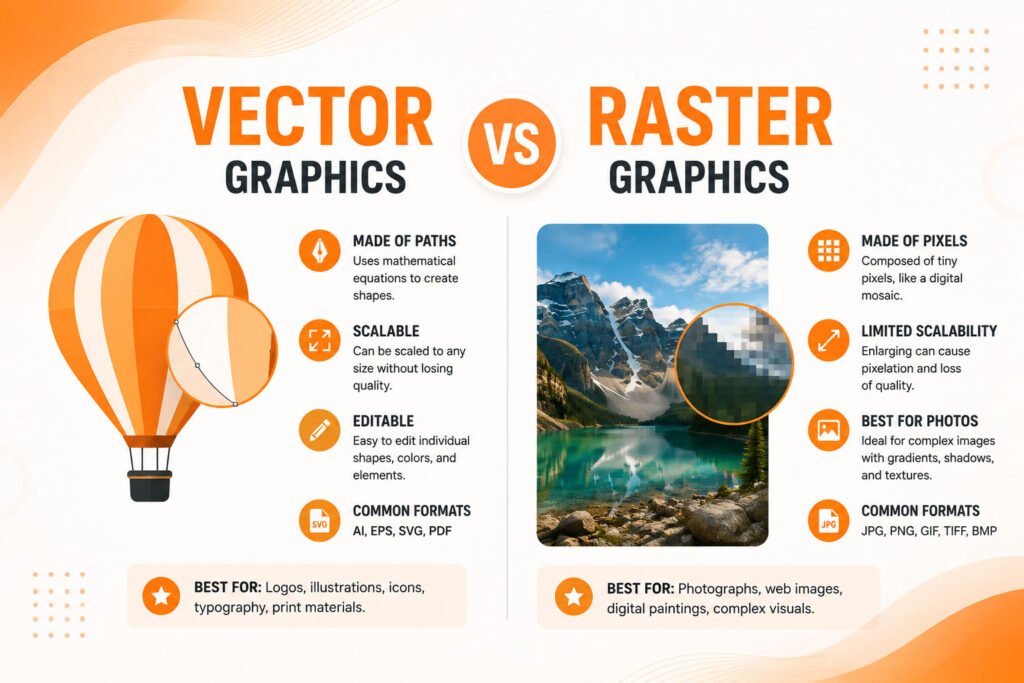
- Vector graphics use mathematical formulas defining shapes and lines
- Raster graphics use a fixed grid of individual colored pixels
- Vector files scale infinitely without any quality loss
- Raster files lose quality when scaled beyond their original resolution
- Each format suits genuinely different use cases and applications
Understanding these fundamental differences helps determine which format genuinely fits each specific business need and application.
Ready for the right graphic files for every application your business needs?
How Vector Graphics Actually Work
Vector graphics store image data as mathematical formulas defining points, lines, and curves, rather than storing individual pixel colors directly. This mathematical foundation means vector images can be scaled to virtually any size from a tiny favicon to an enormous building banner while remaining perfectly crisp and sharp, since the underlying math simply recalculates at whatever new size is genuinely needed.
Common vector file formats include AI (Adobe Illustrator), EPS, SVG, and PDF, though not every PDF is genuinely vector-based. This scalability makes vector graphics the genuinely appropriate format for logos, icons, and any graphic that needs to work reliably across dramatically different sizes and applications without requiring separate files for each specific use case.
💡
Tip
Always request your logo in vector format (AI, EPS, or SVG) from any designer, even if you don't currently need it. Converting a raster logo to genuine vector format later is difficult and often produces inferior results compared to having the original vector file from the start.
How Raster Graphics Differ Fundamentally
Raster graphics, by contrast, store image data as a fixed grid of individual colored pixels think of it as a mosaic made of countless tiny colored squares. This pixel-based approach captures genuine photographic detail and complex color gradients that vector’s mathematical shapes simply can’t replicate as effectively, making raster the appropriate, necessary format for photographs and images with genuinely complex, continuous color variation.
Common raster file formats include JPEG, PNG, GIF, and TIFF, each suited to slightly different use cases based on compression, transparency support, and file size considerations. Unlike vector graphics, raster images have a fixed resolution scaling them beyond their original pixel dimensions genuinely degrades quality, producing the blurry, pixelated appearance familiar from stretching a small image too large.
∞
Maximum scalability for vector graphics without quality loss
300 DPI
Standard resolution requirement for print-quality raster images
60%
Of businesses have experienced logo quality issues from incorrect file formats
When to Use Vector Graphics for Your Business
When to use vector vs raster becomes clear once you understand each format’s genuine strengths. Vector graphics are the correct choice for logos, since they’ll inevitably need to appear at wildly different sizes across your business a tiny social media avatar, a full-size letterhead, and a massive trade show banner all require the same logo working perfectly at each dramatically different scale.
Icons, illustrations with clean lines and solid colors, and any graphic requiring frequent resizing for different applications similarly benefit from vector format’s inherent scalability. Business cards, signage, and any print application requiring precise, sharp reproduction at various sizes also genuinely benefit from starting with vector source files rather than raster alternatives.
When Raster Graphics Are Genuinely Necessary
Photographs are inherently raster-based, since cameras capture images as pixel grids rather than mathematical shapes, making raster format simply unavoidable for genuine photographic content. Complex illustrations with photorealistic detail, gradients, and subtle color variation also typically require raster format’s pixel-based approach to genuinely capture that visual complexity effectively.
Understanding this distinction helps business owners request the right format for the right purpose asking a photographer for vector files makes no genuine sense, just as expecting a logo to work perfectly in raster format across every possible application and scale creates genuine, avoidable quality problems down the line.
A raster logo is a photograph of your brand at one specific size. A vector logo is your brand itself, ready to become whatever size you actually need.
Common Vector and Raster Mistakes to Avoid
Even design-conscious business owners fall into familiar traps: only having a logo in raster format (like a JPEG or PNG) without ever obtaining the original vector source file, attempting to scale raster images beyond their original resolution and accepting resulting blurriness, or requesting vector files from photographers who genuinely can’t provide them for actual photographic content.
The fix isn’t understanding every technical detail of each format it’s knowing to always request and retain vector files for your logo specifically, since that single practice prevents the majority of common file format frustrations businesses genuinely encounter.
How IWS Solutions Can Help
Our team delivers logos and brand assets in proper vector formats alongside necessary raster exports, ensuring your business has the right file type ready for every application, from business cards to billboards.