
ACCESSIBILITY
COLOR DESIGN
Designing for Colorblind Users Accessible Palette Choices
Roughly 1 in 12 men experience some form of color blindness here’s how to design palettes that genuinely work for them too.
Why Color-Only Design Excludes a Genuine Audience
Designing for colorblind users addresses a genuine accessibility gap many businesses unknowingly create relying purely on color to communicate important information (a red “error” versus green “success” indicator, for example) excludes the significant portion of the population who can’t reliably distinguish between those specific colors due to color vision deficiency.
Color blindness design considerations matter more than many businesses realize, since color blindness affects approximately 8% of men and 0.5% of women globally, representing a genuinely substantial audience segment who may be encountering your website or interface without the ability to perceive color the way most design assumes.
The Building Blocks of Colorblind-Friendly Design
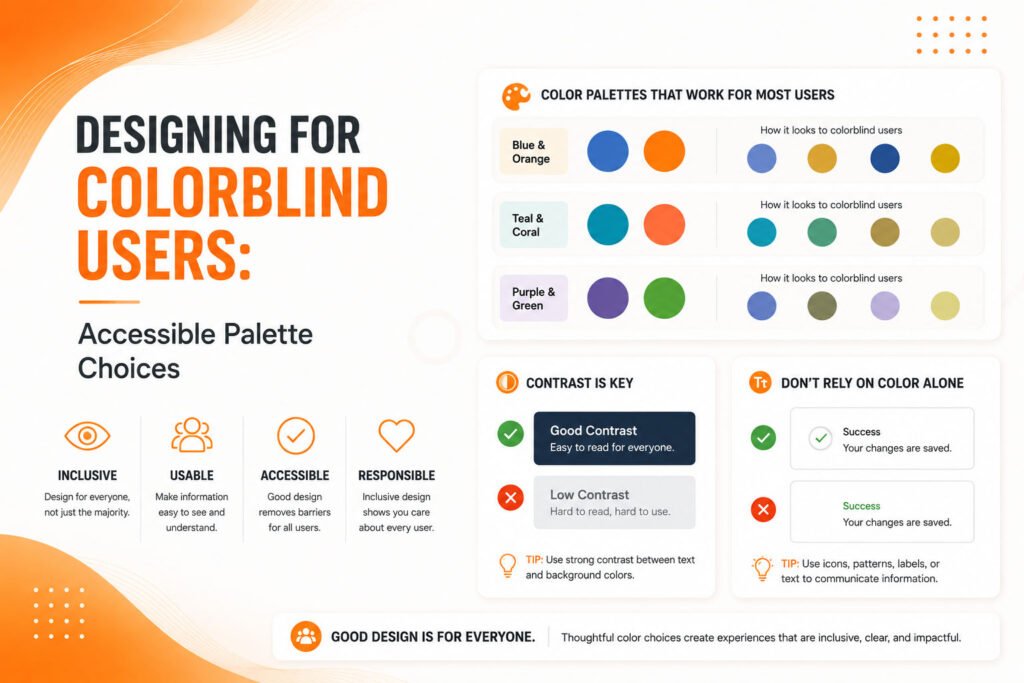
Accessible color palette design requires a combination of thoughtful color selection and genuinely redundant, non-color-dependent communication methods.
- Never relying on color alone to convey critical information
- Sufficient contrast ratios between all foreground and background colors
- Testing designs against common color blindness simulations
- Using patterns, icons, or text alongside color-coded elements
- Choosing palettes that remain distinguishable across color vision types
When these principles are applied, designs remain genuinely functional and clear for the full range of visitors, regardless of individual color vision differences.
Ready for a design that genuinely works for every visitor's vision?
Understanding the Different Types of Color Blindness
Color blindness design requires understanding that “colorblind” isn’t a single, uniform condition different types affect color perception in genuinely different ways. Deuteranopia and protanopia, the most common forms, both affect red-green distinction, making these two colors particularly risky to rely on together for conveying different meanings within an interface.
Tritanopia, a rarer form, affects blue-yellow distinction instead. Understanding these different variations helps explain why the common red-green combination for error/success indicators specifically creates genuine accessibility problems, since it’s precisely the color pairing most commonly and significantly affected by the most prevalent forms of color vision deficiency.
💡
Tip
Use a free colorblindness simulator tool to view your current design as someone with deuteranopia or protanopia would genuinely see it. Critical information that becomes indistinguishable in this simulation needs a non-color-dependent backup signal.
Never Relying on Color Alone
The single most important principle in designing for colorblind users involves never using color as the sole method of conveying important information. A form field indicating an error should include an icon, clear text label, or distinct border pattern alongside any color change, ensuring the message remains genuinely clear even for visitors who can’t reliably distinguish the specific color difference being used.
This principle extends across various interface elements charts and graphs should use patterns or distinct shapes alongside color coding, status indicators should include text or icons beyond color alone, and any critical call-to-action shouldn’t rely purely on being a specific color to stand out from surrounding content.
8%
Of men worldwide experience some form of color blindness
300 Million
People globally affected by color vision deficiency
4.5
Minimum WCAG-recommended contrast ratio for normal text
Choosing Genuinely Distinguishable Color Palettes
Accessible color palette selection benefits from choosing colors that remain distinguishable across different types of color vision, not just relying on hue variation alone. Varying brightness and saturation levels alongside hue helps create genuine distinction that remains perceivable even when specific hue differences become difficult or impossible to distinguish for certain color vision types.
Several established color palette tools specifically designed with colorblind accessibility in mind can help identify combinations that work well across the full range of color vision variations, removing much of the guesswork from manually attempting to select genuinely distinguishable colors without specialized testing or established accessible palette references.
Ensuring Sufficient Contrast for Everyone
Color contrast accessibility matters beyond just color blindness specifically, benefiting all users including those with low vision or simply viewing a screen in bright ambient lighting conditions. WCAG accessibility guidelines recommend minimum contrast ratios between text and background colors, providing a genuinely measurable, testable standard rather than relying purely on subjective visual judgment.
Testing actual contrast ratios using free online tools, rather than assuming a color combination provides sufficient contrast based purely on visual impression, ensures genuine compliance with these established accessibility standards, catching combinations that might look acceptable to typical vision but genuinely fail to meet accessible contrast requirements.
If your design only works when someone can perfectly distinguish red from green, it doesn't actually work for a meaningful share of the people using it.
Common Colorblind Accessibility Mistakes to Avoid
Even design-conscious teams fall into familiar traps: using red and green exclusively to indicate different statuses without any additional non-color signal, choosing color palettes without testing against colorblindness simulations, or assuming sufficient contrast without actually measuring it against established accessibility standards.
The fix isn’t avoiding color entirely it’s ensuring color is always genuinely supplemented by other, non-color-dependent signals that communicate the same information clearly to every visitor.
How IWS Solutions Can Help
Our team designs with genuine color accessibility in mind from the start, ensuring interfaces and brand palettes work clearly for visitors across the full range of color vision differences.