
WEB SECURITY
SMALL BUSINESS
Website Security Best Practices for Small Businesses
Practical, non-technical steps to protect your website, your customer data, and your reputation from increasingly common cyber threats.
Why Small Businesses Are Frequent Targets
Many small business owners assume h ackers only target large companies, but the opposite is often true. Cybersecurity for small business matters precisely because smaller sites frequently have weaker defenses, making them easier, lower-risk targets for automated attacks that scan thousands of websites looking for exploitable vulnerabilities.
Website security best practices aren’t optional extras reserved for large enterprises they’re essential safeguards for any business collecting customer information, processing payments, or simply wanting to avoid the reputational damage of a compromised site showing malware warnings to visitors.
The Building Blocks of a Secure Website
Small business website security isn’t one setting it’s a combination of layered protections that together make a site significantly harder to compromise.
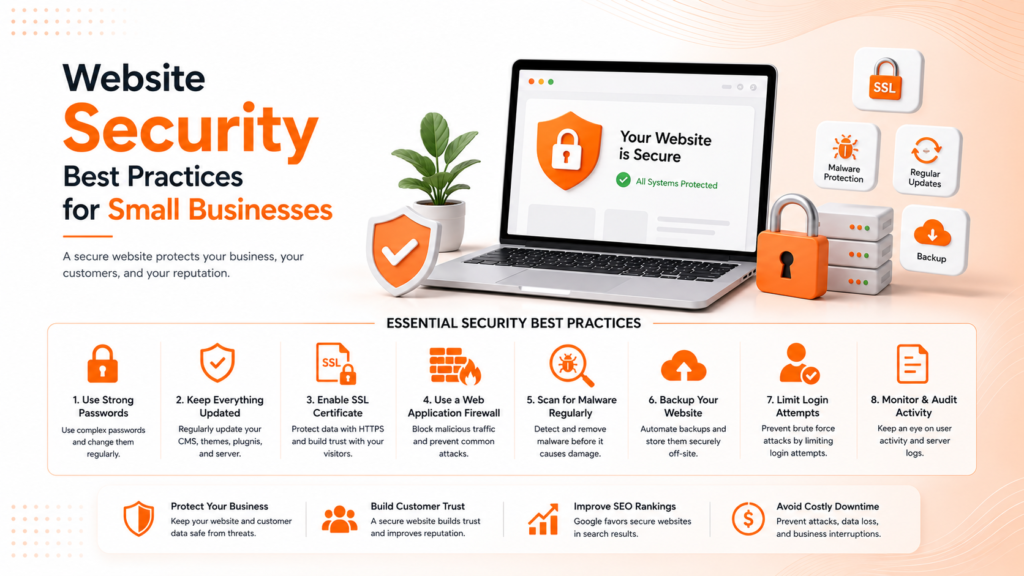
- A valid, properly configured SSL certificate
- Regularly updated software, plugins, and themes
- Strong, unique passwords with two-factor authentication
- Regular automated backups stored securely off-site
- Website malware protection and monitoring tools
When these layers work together, most common attacks are blocked before they can cause any real damage.
Ready for a website that's actually protected against real threats?
Start With an SSL Certificate
An SSL certificate is one of the most basic yet essential website security tips, encrypting data transferred between your site and visitors. Beyond security, it’s now effectively required browsers actively flag sites without SSL as “not secure,” and Google factors it into search rankings as well.
Most secure website hosting providers now include free SSL certificates, making this one of the easiest security measures to implement with genuinely no reason to skip it, regardless of business size or technical budget.
💡
Tip
Check your site right now if the address bar shows "Not Secure" instead of a padlock icon, that's an immediate, high-priority fix affecting both trust and search rankings.
Keep Everything Updated
Outdated software is one of the most common entry points for attackers, since known vulnerabilities in old plugin or CMS versions are widely documented and actively exploited by automated scanning tools. Regularly updating your CMS, plugins, and themes closes these gaps before they can be used against you.
This applies especially to WordPress sites, where the vast plugin ecosystem that makes the platform so flexible also means more potential entry points if individual plugins aren’t kept current. Removing unused plugins entirely, rather than just deactivating them, further reduces this exposure.
43%
Of cyberattacks target small businesses specifically
60%
Of small businesses close within 6 months of a major cyberattack
83%
Reduction in breach risk with two-factor authentication enabled
Strengthen Access Controls and Passwords
Weak or reused passwords remain one of the most exploited vulnerabilities across small business websites. Enforcing strong, unique passwords for every admin account, combined with two-factor authentication, dramatically reduces the risk of unauthorized access even if a password is somehow compromised elsewhere.
Limiting the number of people with administrative access, and reviewing user permissions periodically, further reduces risk. Former employees or contractors retaining unnecessary access is a surprisingly common, easily preventable security gap.
Implement Backups and Malware Monitoring
Regular, automated backups stored somewhere separate from your live server ensure that even a successful attack doesn’t mean permanent data loss. Without this safety net, a compromised site can mean losing months or years of content, customer data, and configuration entirely.
Website malware protection tools that actively scan for suspicious code or unusual file changes catch problems early, often before they become visible to visitors or search engines. Many secure website hosting providers include this monitoring as a standard feature, making it worth verifying what’s actually included in your current plan.
Have a Response Plan Before You Need One
Even with strong prevention measures, no website is completely immune to every possible threat. Having a clear response plan who to contact, how to restore from backup, how to communicate with affected customers if data was compromised turns a potential crisis into a manageable, methodical recovery process.
Businesses without a plan often lose valuable time figuring out basic response steps during the actual incident, when speed matters most for limiting damage and restoring normal operations.
Website security isn't about being unhackable it's about making your site enough of a hassle that automated attacks move on to an easier target.
Common Website Security Mistakes to Avoid
Even careful business owners fall into familiar traps: delaying software updates for months, reusing the same password across multiple accounts, or assuming their hosting provider handles all security automatically without verifying what’s actually included.
The fix isn’t a massive security overhaul it’s consistent, basic hygiene. Regular updates, strong passwords, and automated backups prevent the vast majority of common attacks without requiring specialized technical expertise.
How IWS Solutions Can Help
Our team implements comprehensive website security best practices for every project, from SSL setup to ongoing monitoring, helping small businesses protect their site, their data, and their customers’ trust.