
SEO WEBSITE
MIGRATION
How to Migrate Your Website Without Losing SEO Rankings
A careful, step-by-step approach to website migration that protects the rankings you’ve already worked hard to earn.
Why Website Migration Is So Risky for SEO
Website migration whether it’s a redesign, platform change, or domain switch is one of the few SEO events that can cause immediate, dramatic ranking drops if handled carelessly. Search engines rely on consistent signals over time, and a poorly executed migration disrupts nearly all of them at once.
Migrate website without losing rankings isn’t about avoiding change entirely it’s about managing that change deliberately, so search engines can recognize and transfer trust to the new version rather than treating it as an entirely new, unproven site starting from zero.
The Building Blocks of a Safe Migration
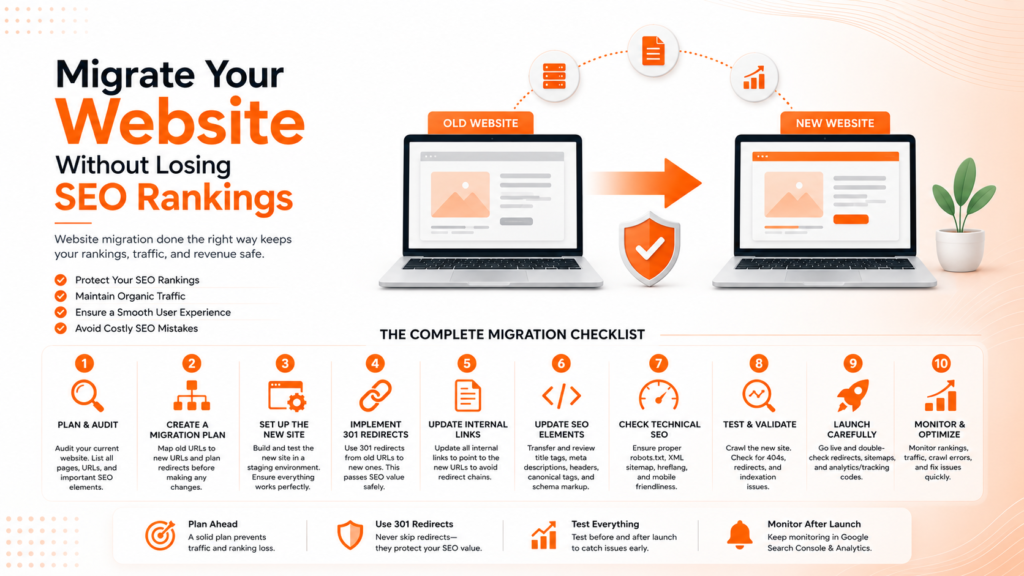
A proper site migration checklist isn’t one step it’s a sequence of careful actions that together preserve the SEO equity built over months or years.
- A complete audit of existing URLs and rankings before migration
- Properly mapped 301 redirects for every changed URL
- Updated XML sitemap submitted immediately after launch
- Preserved on-page content, titles, and meta descriptions
- Close monitoring of rankings and traffic in the weeks after launch
When these steps are followed carefully, migration risk drops significantly, even for large, complex websites.
Ready to migrate your website without losing your rankings?
Step 1: Audit Everything Before You Touch Anything
Before any changes happen, a complete audit of your current site is essential every indexed URL, current rankings, existing backlinks, and top-performing pages need to be documented. This becomes your baseline for comparison after migration, and more importantly, your map for what needs to be preserved.
Skipping this step is one of the most common reasons migrations go wrong. Without a clear picture of what currently exists and ranks, it’s impossible to verify afterward whether everything was actually carried over correctly, or to quickly identify what’s missing if rankings drop.
💡
Tip
Export your full URL list and current rankings from Google Search Console before making any changes. This single file becomes your most valuable reference throughout the entire migration process.
Step 2: Map and Implement 301 Redirects Correctly
301 redirects are the single most critical technical element of domain migration SEO. Every old URL needs to redirect to its most relevant new equivalen not just to the homepage as a blanket catch-all, which tells search engines the specific page no longer exists and wastes the ranking equity that URL had built.
This mapping process takes time for larger sites, but shortcuts here almost always cause the most significant ranking losses. A one-to-one redirect map, tested thoroughly before launch, preserves the specific relevance search engines associate with each individual page.
40%
Average traffic drop from a poorly executed website migration
2–4 Weeks
Typical recovery window for a well-planned migration
90%
Of ranking equity preserved with proper 301 redirect mapping
Step 3: Preserve Content and On-Page SEO Elements
Website relaunch SEO often fails not because of technical redirect issues, but because content gets rewritten, shortened, or restructured during the redesign process without considering what was already ranking well. If a page was performing strongly, preserve its core content, headings, and keyword targeting even while updating the visual design around it.
Meta titles and descriptions deserve the same care. These should transfer directly to the new site unless there’s a clear, strategic reason to change them migration is not the ideal time to simultaneously test entirely new on-page SEO elements alongside a technical platform change.
Step 4: Update Technical Signals Immediately at Launch
The moment the new site goes live, submit an updated XML sitemap through Google Search Console and verify that the new domain or structure is properly set up for tracking. Any delay here means search engines take longer to discover and re-crawl your migrated pages.
It’s also worth reaching out to major sites linking to you, requesting updated links to the new URLs where feasible, since preserved backlinks continue passing authority more reliably than links pointing to old URLs that now rely entirely on redirects.
Step 5: Monitor Closely After Launch
The weeks immediately following migration require close monitoring, not a set-it-and-forget-it approach. Watch Google Search Console daily for crawl errors, indexing issues, or unexpected ranking drops, and compare traffic against your pre-migration baseline to catch problems while they’re still easy to fix.
Having a rollback plan a way to quickly revert if something goes seriously wrong provides essential peace of mind, especially for larger, more complex site migrations where the risk of unforeseen issues is naturally higher.
A website migration doesn't fail because of the redesign it fails because of the redirects, sitemaps, and details nobody thought to double-check before launch.
Common Website Migration Mistakes to Avoid
Even experienced teams fall into familiar traps: redirecting everything to the homepage instead of mapping specific pages, rewriting content during migration instead of after, or failing to monitor rankings closely in the critical weeks following launch.
The fix isn’t rushing the migration it’s methodical preparation. A carefully planned migration, executed step by step, will consistently preserve rankings far better than a rushed relaunch almost every time.
How IWS Solutions Can Help
Our team manages complete website migrations with careful redirect mapping, technical audits, and post-launch monitoring protecting the SEO equity you’ve already earned throughout the entire process.