
UI/UX DESIGN
WEB DESIGN
UI vs UX Design Explained Simply
Two terms constantly used together, but they solve different problems here’s a clear breakdown of what each one actually means for your website or app.
Why UI vs UX Confuses So Many Business Owners
Ui vs ux gets treated as one combined skill so often that many business owners don’t realize they’re actually two distinct disciplines, each addressing a different part of how a website or app functions. This confusion often leads to mismatched expectations when hiring expecting a UI designer to solve UX problems, or vice versa.
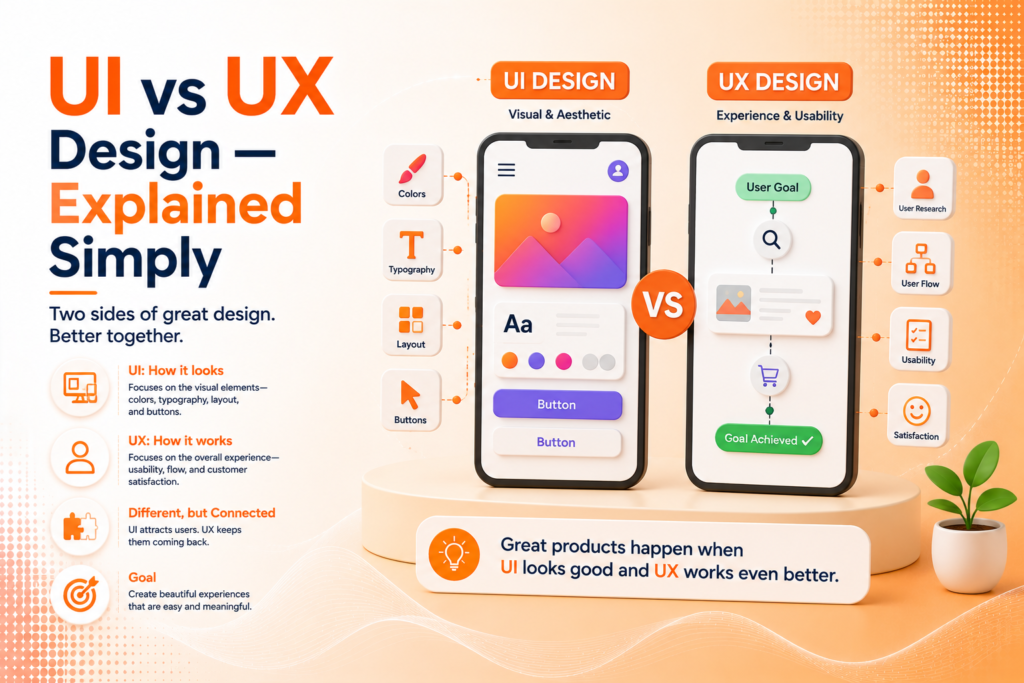
What is user interface design, really? It’s the visual layer — colors, buttons, typography, and layout. User experience design basics, by contrast, focus on how a product actually functions and feels to use, including navigation flow, ease of use, and whether users can accomplish their goals without friction. Both matter, but they solve fundamentally different problems.
The Building Blocks of Each Discipline
Ux vs ui design isn’t one skill split in half it’s two related but distinct disciplines, each built from its own set of considerations.
- UI focuses on visual elements: color, typography, spacing, and buttons
- UX focuses on structure: navigation, flow, and usability
- UI answers “does it look right and feel on-brand”
- UX answers “can users accomplish their goal easily”
- Both disciplines rely on prototyping and testing before final development
Understanding this distinction helps businesses evaluate whether a project actually needs deeper UX research, purely visual UI polish, or genuinely both working together.
Ready for a website or app that looks great and actually works well?
What UI Design Actually Covers
User interface design is the layer users see and interact with directly buttons, icons, color schemes, typography, and layout. A skilled ui/ux designer working on the interface side focuses on making every visual element clear, consistent, and aligned with the brand, while ensuring interactive elements are obviously clickable or tappable.
Ui website designs succeed when visual consistency is maintained throughout — the same button style, spacing, and color usage across every page, so users never have to relearn how to interact with the interface as they navigate. A graphic design website that looks polished on the homepage but inconsistent on interior pages quietly undermines the professional impression the design was meant to create.
💡
Tip
If users describe your product as "confusing" despite compliments on how it looks, that's a UX problem, not a UI one. Beautiful interfaces can still be genuinely hard to use.
What UX Design Actually Covers
User experience design basics center on how a product functions from the user’s perspective can they find what they’re looking for, complete a purchase, or sign up without unnecessary friction or confusion. UX work often starts before any visual design begins, through research, user flows, and wireframing that map out how the product should function structurally.
This is particularly critical for mobile app design, where screen space is limited and every unnecessary tap or confusing menu directly impacts whether users continue using the app or abandon it. Ui/ux design services that skip proper UX research often end up building a visually attractive product that quietly frustrates the very users it was meant to serve.
88%
Of users are less likely to return after a bad user experience
94%
Of first impressions are design-related
100%
Higher conversion rates from well-executed UX improvements
Why Prototyping Bridges Both Disciplines
Prototyping is where UI and UX genuinely come together turning wireframes and visual concepts into an interactive, testable version of a website or app before full development begins. This step catches usability issues early, when changes are still relatively inexpensive to make, rather than after a product has already been fully built.
For mobile app design services specifically, prototyping is especially valuable, since testing navigation and interaction patterns on an actual device reveals issues that are much harder to spot in flat, static design mockups alone.
Do You Need UI, UX, or Both?
Most projects genuinely need both disciplines working together, but the starting point depends on the specific problem. A visually outdated website with clear, functional navigation likely needs UI-focused work a redesign that keeps the structure but modernizes the look. A confusing app with declining user retention, despite looking fine visually, likely needs UX-focused research and restructuring instead.
Ui/ux design services that assess this correctly upfront save businesses from investing in the wrong type of design work a beautiful redesign won’t fix a fundamentally confusing navigation structure, just as improved navigation alone won’t fix a dated, unprofessional visual appearance.
UI is how a product looks. UX is how it works. A great product needs both but they solve completely different problems.
Common UI/UX Mistakes to Avoid
Even well-intentioned teams fall into familiar traps: prioritizing visual polish over usability testing, skipping prototyping entirely, or assuming a UI redesign will fix problems that are actually rooted in confusing UX structure.
The fix isn’t choosing one discipline over the other it’s understanding which problem you’re actually solving. A product that’s both intuitive to use and visually consistent will outperform one that’s strong in only one area almost every time.
How IWS Solutions Can Help
Our team provides complete ui/ux design services, from user research and wireframing to visual interface design and prototyping for both websites and mobile app design projects.